Start a project

contact@leansystems.ge · Tbilisi UTC+4

Business trips at Cellfie, from request to settlement.

Cellfie Mobile employees plan trips, get them approved and report their expenses in one app. Allowances and taxes are calculated for them, and the advance and final settlement go straight to SAP.

Client
Cellfie Mobile
Industry
Telecom
Built with
Odoo · React
Live since
Jan 2026
Delivered in
4 months
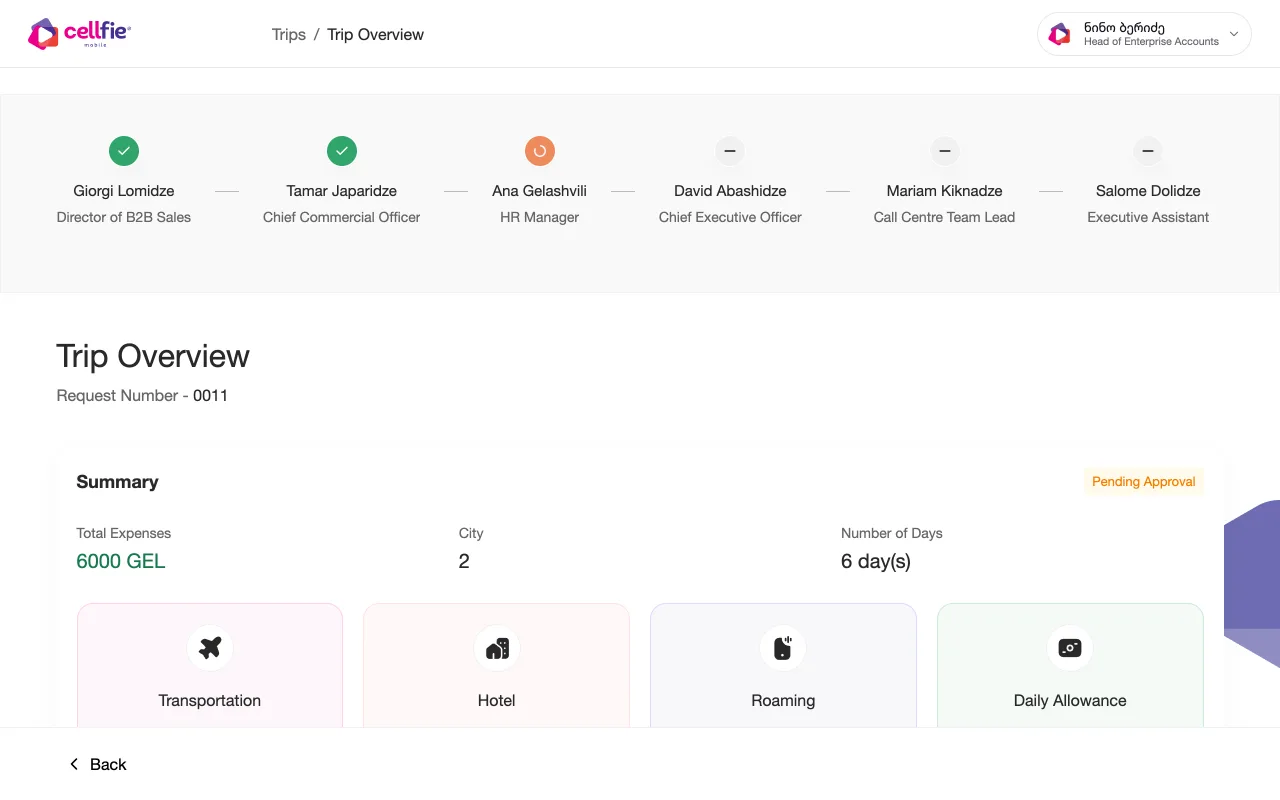
A trip page in the Cellfie business-trip app: the approval chain across the top, with two approvals done and HR next, above the trip summary.
01 · A trip page: who has approved, and who’s next

A The challenge

One business trip, up to a dozen people involved.

A trip at Cellfie involves more than the traveller. A supervisor and a department head approve it, an assistant books hotels and tickets, a fuel administrator signs off fuel, HR and the call centre arrange mobile roaming, and accounting pays the advance and settles the costs.

Every step comes with rules: daily allowances and hotel and roaming limits that depend on the employee’s grade, legal per-diem limits that differ by country, and income tax and pension on anything paid above those limits.

Cellfie wanted one place where all of this happens, connected to the systems the company already runs.

B How it works

Four steps, one record of everything.

  1. 01

    Plan

    The employee adds each city with hotel, transport and fuel, and asks for roaming if needed. The app checks that trips don’t overlap and that every day is covered.

  2. 02

    Approve

    The approval chain builds itself from the trip’s details. Approvers can approve, decline or send it back, and see exactly where each trip stands.

  3. 03

    Prepare

    Hotels and tickets are booked, fuel is set and roaming is switched on. Once approved, the advance payment request goes to SAP automatically.

  4. 04

    Report & settle

    After the trip the employee enters actual costs with receipts. Accounting reviews them, the settlement posts to SAP, and the payment status comes back on its own.

C What we built

The rules live in the software, not in people’s heads.

Custom modules on open-source Odoo Community run the approvals, calculations and accounting, with no per-user licence fees. Travellers and approvers never see Odoo: they use a web app we designed for them, while accounting works in Odoo’s back office.

01 Approvals

Approval chains that build themselves.

Separate rules for local and international trips add only the steps a trip needs: roaming brings in HR and the call centre, fuel brings in the fuel administrator. If an approver is on leave or travelling, the step moves to their stand-in automatically, and every decision stays in the trip’s history.

02 Calculations

Allowances and taxes, worked out.

Daily allowances and hotel and roaming limits follow the employee’s grade and the trip. For each country the app applies the legal limits, calculates income tax and pension on anything above them, and shows whether the company owes the employee or the other way round.

03 Employee app

An app built for the people who travel.

A fast web app that works on phones, in Georgian, with English ready to switch on. My Trips and My Approvals show what needs attention, receipts are uploaded in place, and planned costs sit next to actual ones.

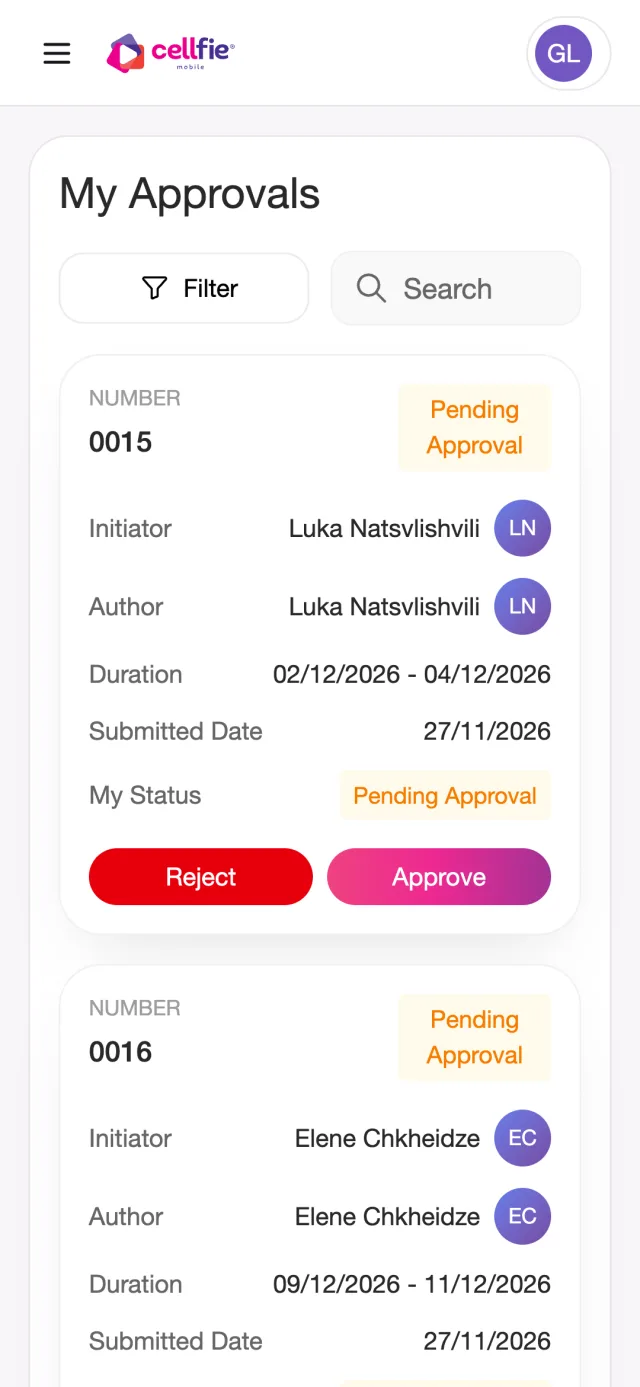
My Approvals on a phone: trips waiting for a manager, each with its dates and Approve and Reject buttons.
02 · My Approvals on a phone
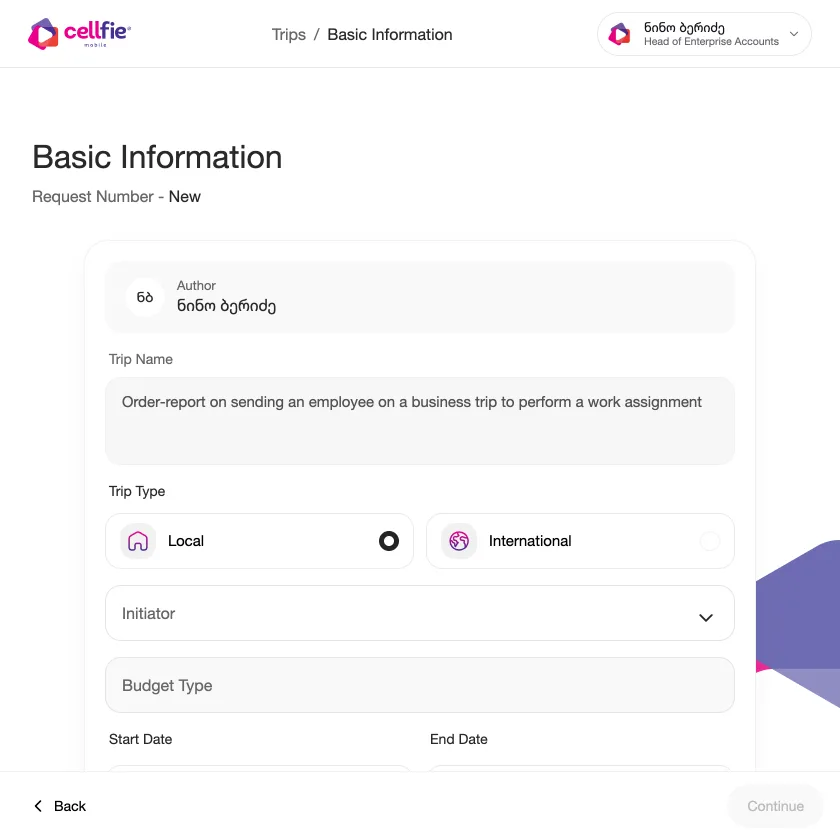
Starting a new trip in the app: trip name, local or international, initiator and budget.
03 · Starting a new trip

D Integrations

Connected to the systems Cellfie already runs.

Nobody types employee data twice. People sign in with their work accounts, their details come from HR, and every payment lands in accounting.

Microsoft sign-in. Employees log in with their existing Microsoft work accounts (Microsoft Entra ID, formerly Azure AD), so there are no new passwords to manage.

HR system. Employees, positions, reporting lines and approved leave with stand-ins sync automatically from SelfHR, so approvals always go to the right person.

SAP. The advance is posted when a trip is approved, the settlement entries after the expense report, and SAP sends the payment status back automatically.

Odoo CommunityReactTypeScriptREST APISAP integrationMicrosoft Entra IDHR system syncGeorgian & English
E Results

What changed for Cellfie.

Live since January 2026, four months after we started, including a month of custom design.

Users500+

Employees using the app.

Trips90+

Business trips a month.

Approvals900+

Approval decisions a month.

Boring work removedMany

Manual steps automated away, and the friction with them.

See all references

Trips, approvals, expenses?

The same approach fits any process that runs on approvals: purchase requests, leave, expenses. If one of yours still runs on forms, email and spreadsheets, tell us about it.